


Why act now?
Open-source compliance is no longer just a matter for developers. The Cyber Resilience Act, obligations regarding SBOMs and lifecycle security, the new EU Product Liability Directive and the requirements of companies' own customers affect every organisation that develops or supplies software.
Scanning tools only cover the first step: they show which components and licence texts are contained within the product. The real work for project managers and in-house counsel begins afterwards. What obligations does a licence trigger in a specific use case? Which interpretation should be followed if the legal situation is disputed? And what should be done in the event of licence conflicts?
These questions can only be answered from a legal perspective. Our lawyers, who work with open-source licences on a daily basis, have therefore not simply set out their assessments in individual legal opinions, but have consolidated, substantiated and made them analysable. To make OSS compliance as efficient as possible, we have developed a tool: the FOSSmatrix.
What is the FOSSmatrix?
The FOSSmatrix combines two elements: the systematic approach of a tool and the expertise of one of the leading commercial law firms in the open-source sector, which has been handling OSS mandates for over 15 years. What does that mean in detail?
The FOSSmatrix is a compliance platform for handling open-source software – developed by the lawyers at Osborne Clarke in collaboration with OC Solutions. While the legal assessments, methodologies and decision criteria are based on our many years of open source advisory work, OC Solutions has transformed this expertise into a scalable platform and made it available for operational use in companies. The FOSSmatrix provides a clear overview of your licence portfolio, maps the obligations of each licence to the specific use case, scores risks with percentage precision and records every decision in the audit trail.
The foundation is our Knowledge Database: over 200 OSS licences, legally assessed against 68 legal attributes and accompanied by comprehensive explanations. The assessments are continuously updated in line with legal developments – most recently, for example, to include attributes relating to the use of open source in AI and ML projects.
How do you use it? Set up the system once and make the key decisions. After that, every further check is just a click away.
If so, sign up now for our webinars, where we’ll provide you with in-depth insights and a practical demonstration!
Dienstag, 06.10.2026 10:00–11:00 Uhr
What's in it for me?
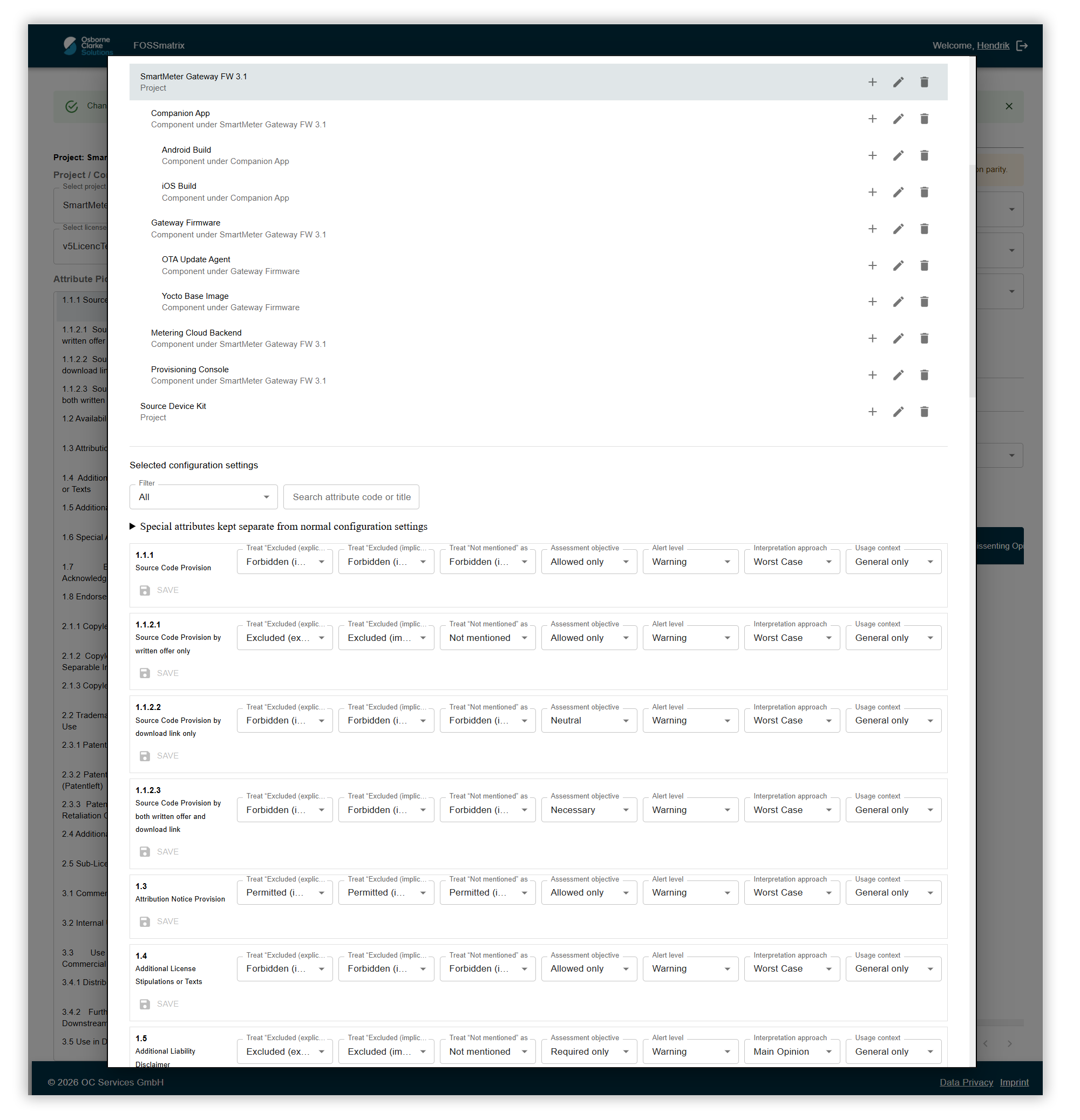
Step 1: Define use cases
Four ready-made template profiles – developed by us for standard use cases distribution, ASP/SaaS, internal use and releasing your own open-source software (outbound licensing) – get you started straight away. Each profile can be copied, customised and saved as your own template until it precisely matches your specific use case. For each attribute, you set the rules: what is permitted, where do you want a warning, and what is a show-stopper? And how strictly do you handle controversial questions of interpretation? All directly within the interface.
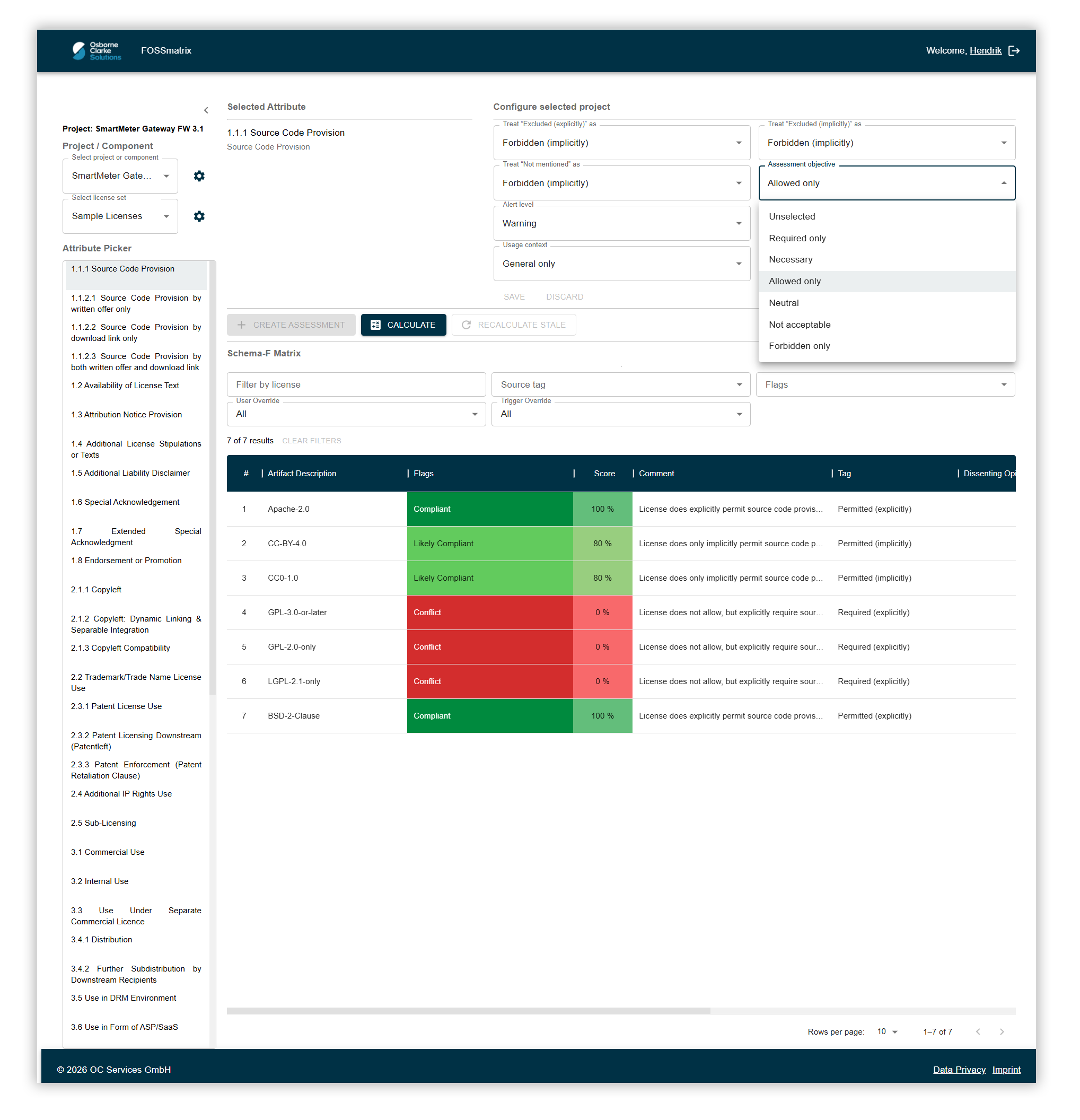
Step 2: Embed your own policy in the licence base
Read a licence differently from the prevailing view? Need to enforce a group-wide rule? Simply adjust the assessment once centrally at the level of a licence, a component or a project – with justification, the person responsible and a timestamp. This decision then applies to every project and every check. New projects inherit the configuration without anyone having to set it up again. A policy decision becomes company-wide practice.
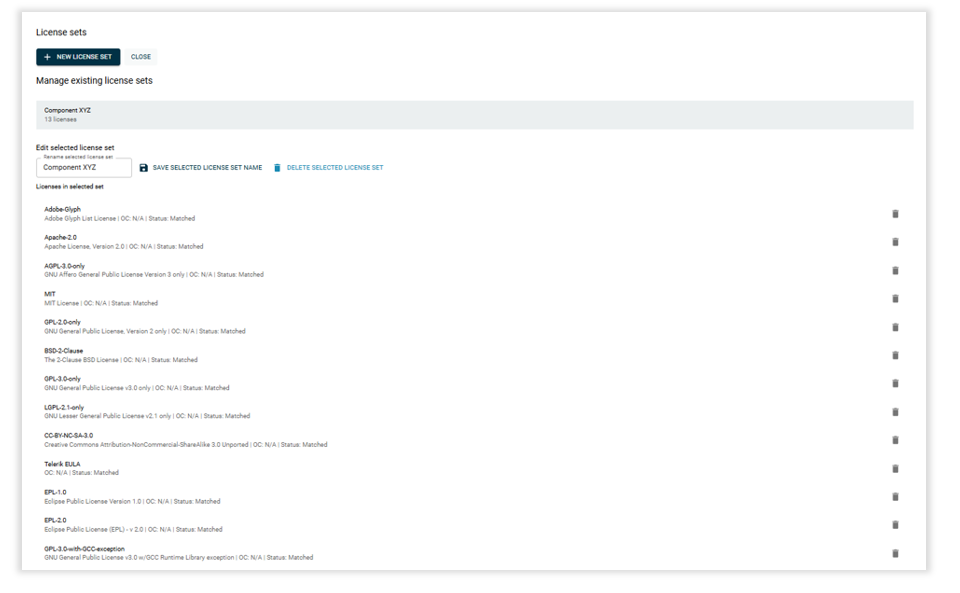
Step 3: Import components
The SBOM or licence list is imported into the platform via the web interface, as a CSV file or via the API. Using the API, FOSSmatrix integrates directly into the CI/CD pipeline and performs checks automatically there. Whether a project is set up permanently or a list is checked once – the imported licences are assigned immediately.
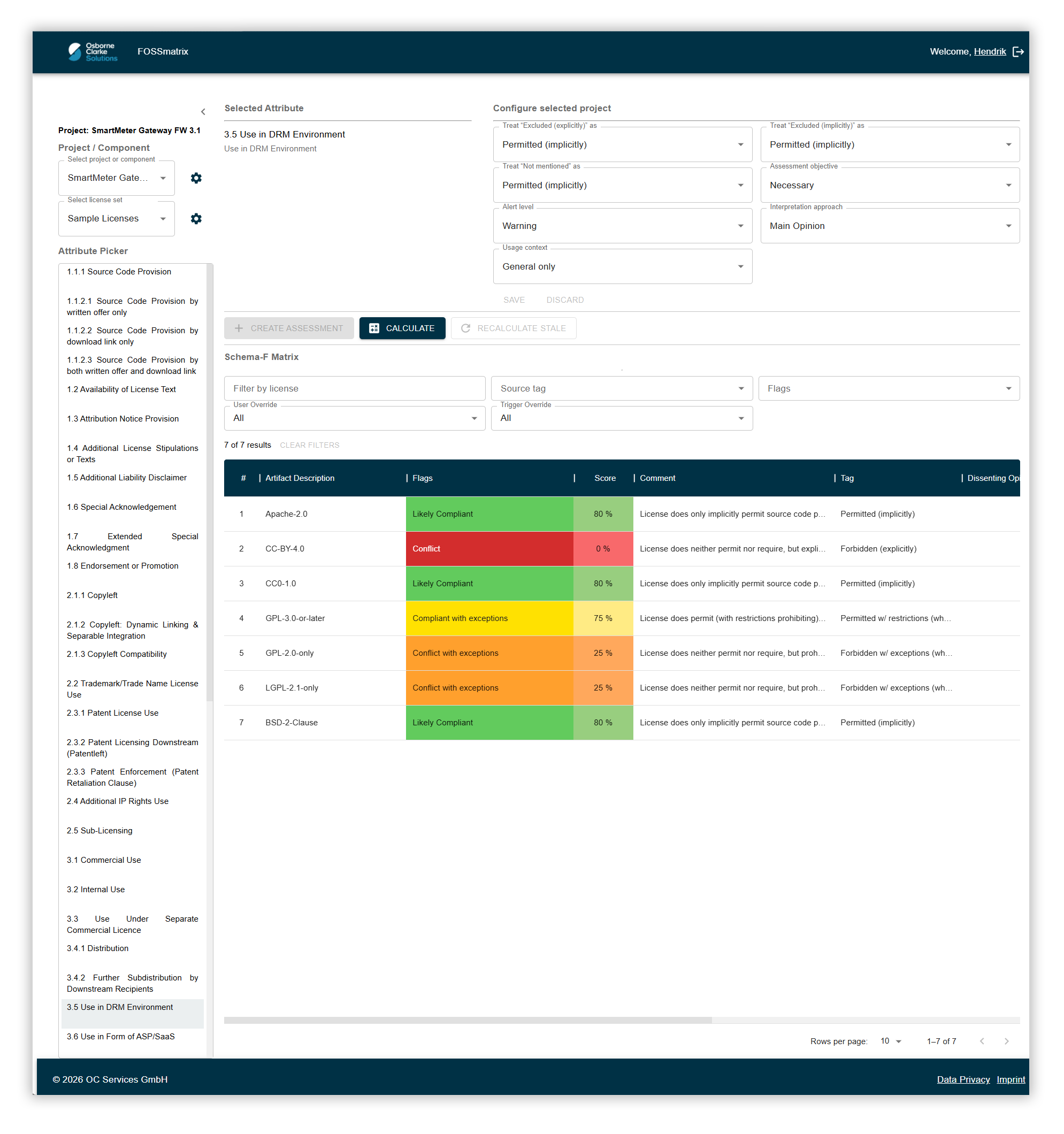
Step 4: The result
One click and the flag, score and justification are displayed for each licence. For a quick preliminary check – for example, if the software stack is not yet finalised – a glance at the traffic light system is enough.
The critical cases are the unclear ones, and this is precisely where the platform's strength lies. Where the interpretation is disputed, we show the minority opinion alongside the prevailing one, and you decide for yourself which to follow. Where a licence is silent, assumptions made in Phase 1 may apply. Whether an obligation is triggered depends on the use case: what is critical when selling a device may have no consequences in a SaaS operation – the scores take this into account. And where a conflict arises, the platform suggests specific ways to resolve it. In this way, grey areas become visible instead of binary assessments – yet these can still be processed automatically.
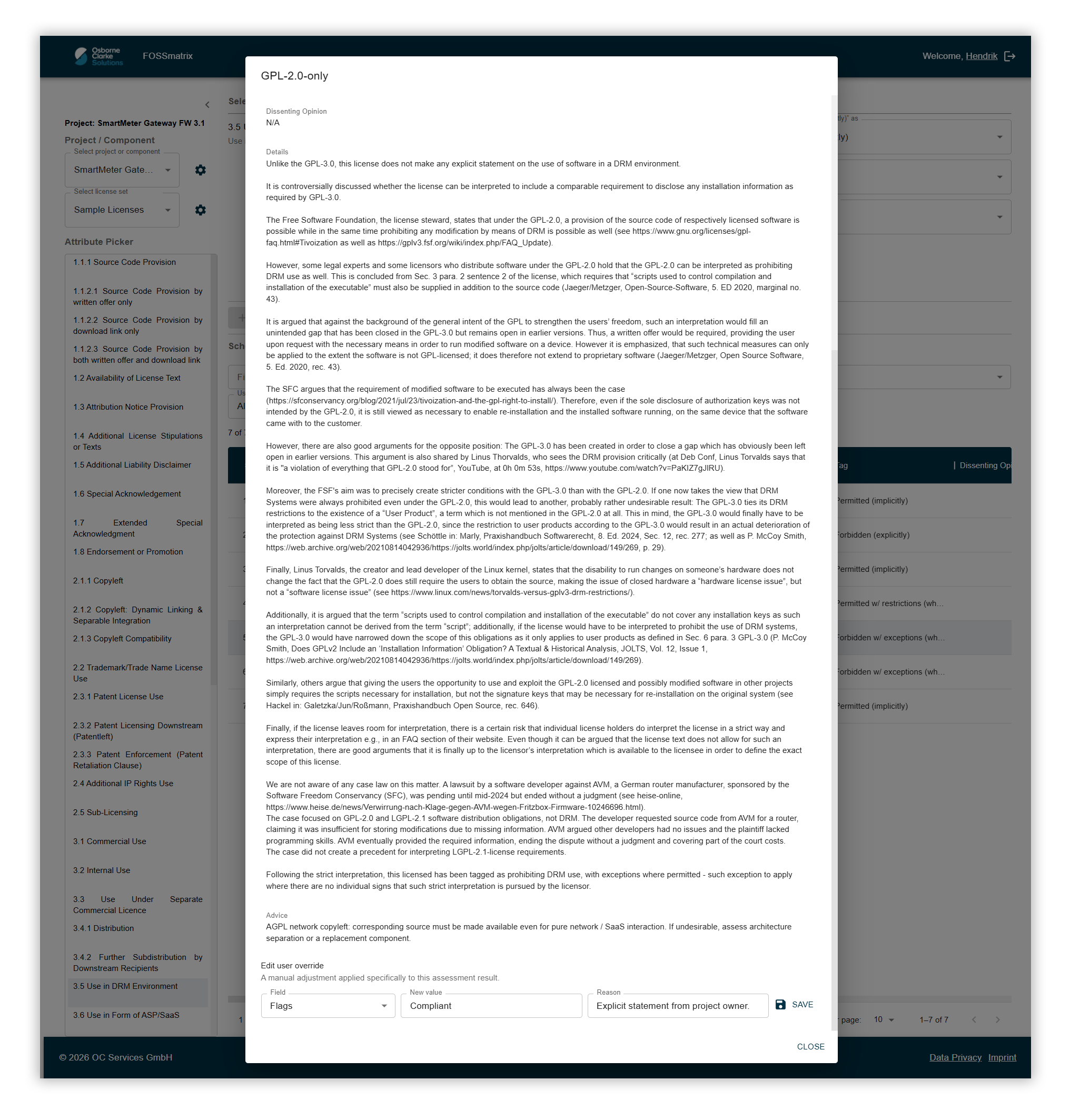
Step 5: Resolve and document conflicts
Red flags are not a final state, but tasks. They are resolved at the source: the component is replaced, the method of integration is changed or the source code is provided – and this action is recorded as a resolution. The result therefore does not change at the touch of a button, but because it is documented why the conflict no longer exists. Resolutions can be recorded at three levels: for the licence itself, for a specific component, or just within a single project – in each case with a reason, the person responsible and a timestamp.
Step 6: The audit report
The end result is a report that shows not only the outcome, but also the path taken to reach it: who decided what, when and at what level – from company-wide guidelines right down to individual exceptions within a project. For internal reviews, customer audits and the documentation required by the CRA: SBOM, audit trail and decision log all in one place.